How Does an AI Image Generator Work? A Beginner’s Guide
Learn how an AI image generator works, explore the technology behind AI image generation, and discover how to create images using simple text prompts.
 Prerana B A
Artificial intelligence is transforming digital content creation, allowing an AI image generator to turn text descriptions into visuals within minutes. Powered by machine learning and deep learning, these tools support content creation for marketing, social media, websites, and education. Understanding how AI image generators work helps beginners write effective prompts, improve results, and recognise their limitations.
The growing adoption of these tools is also driving market expansion. According to Grand View Research, the global AI image generator market was valued at US$474.2 million in 2025 and is projected to reach US$1.853 billion by 2033, growing at a CAGR of 18.8%.
What Is an AI Image Generator?
An AI image generator is a software tool that uses trained artificial intelligence models to create images from text prompts, reference images, or other supported inputs. It learns visual patterns from training data and uses those patterns to generate new images that match the requested description.
Refer to these articles:
- Generative AI and Predictive AI: Key Differences Explained
- Supervised vs. Unsupervised Learning: What’s the Difference?
- Generative Adversarial Networks (GANs): How are GANs Transforming AI?
How AI Image Generators Turn Text into Visuals
An AI image generator interprets written descriptions and transforms them into visual elements, including objects, colours, backgrounds, lighting, and composition. Rather than retrieving an existing photograph, it creates new images based on patterns learned during training and details provided in the prompt.
Common Types of AI Image Generation Tools
AI image generation tools support different creative workflows.
- Text-to-image tools: Create images from written descriptions.
- Image-to-image tools: Transform an existing image according to instructions.
- Image editing tools: Modify selected areas, remove objects, or replace backgrounds.
- Style-based tools: Produce visuals that follow particular artistic or photographic styles.
Some tools combine several capabilities, allowing users to generate, edit, and refine images within one interface.
Everyday Applications of AI-Generated Images
AI-generated images can support a variety of tasks, including:
- Creating social media posts, banners, and advertising concepts.
- Designing invitations for birthdays, weddings, and special occasions.
- Developing product mock-ups and website illustrations.
- Preparing educational visuals and presentation graphics.
- Exploring character designs, interior layouts, and creative concepts.
- Producing early-stage campaign ideas for businesses and startups.
For example, a small business could generate several visual concepts for a new product launch before choosing a direction for its final advertising campaign.
How Does an AI Image Generator Work?
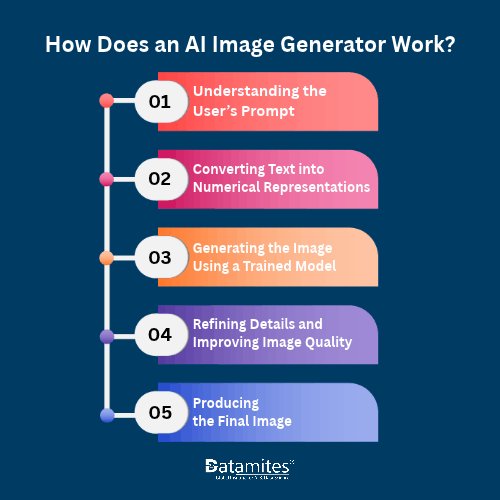
An AI image generator uses trained machine learning models to understand a text prompt and create an image. It interprets the description, generates visual elements, refines details, and produces a final image based on the user's instructions.
Step 1: Understanding the User’s Prompt
The process begins when a user enters a text prompt describing the desired image. The AI identifies details such as the subject, setting, and style. For example, “a red electric scooter with morning sunlight and a clean background” gives the model clear instructions. Specific prompts help generate images that better match the user’s expectations.
Step 2: Converting Text into Numerical Representations
AI image generators use text encoders to convert prompts into numerical representations. These help the model connect words with visual concepts learned during training. For example, “sunset” may relate to orange skies, warm lighting, and long shadows. This process helps the model interpret text and generate relevant images.
Step 3: Generating the Image Using a Trained Model
The trained model uses the prompt to guide image creation. In diffusion-based systems, generation often starts with random noise, which the model gradually refines into an image that matches the description. This process requires computing power, especially for high-resolution images or multiple variations.
Step 4: Refining Details and Improving Image Quality
During generation, the model builds shapes, textures, colours, and object details. Some systems also enhance resolution and visual quality. However, the final image may not perfectly match every detail in the prompt.
Step 5: Producing the Final Image
The generated representation is converted into a viewable image. The tool may also offer variations or editing options. For example, a prompt describing a futuristic skyline with sustainable buildings and autonomous transport can produce an imaginative scene based on the model’s learned patterns, rather than an accurate depiction of a real place.
What Technology Powers AI Image Generation?
AI image generation relies on technologies such as deep learning, neural networks, text encoders, and generative models. Different tools combine these technologies in different ways, so there is no single architecture used by every AI image generator.
Deep Learning and Neural Networks
Deep learning uses multi-layered neural networks to learn patterns from data. AI image generators use these patterns to recognise shapes, colours, textures, and objects and create images based on text prompts.
Diffusion Models and Their Role in Image Creation
Diffusion models are widely used in AI image generation. They learn to create images by gradually removing noise from a random pattern. Guided by a text prompt, the model refines the pattern over multiple steps to produce a recognisable image, such as a realistic scene, illustration, or digital artwork.
Generative Adversarial Networks (GANs)
Generative Adversarial Networks (GANs) use two neural networks: a generator that creates images and a discriminator that checks whether they look real. During training, both networks improve through this competition. GANs are used for image generation and enhancement, although many modern text-to-image tools rely on diffusion models or other architectures.
Natural Language Processing and Text Encoders
Natural language processing (NLP) helps computers understand human language. In AI image generation, text encoders convert prompts into numerical representations that help models connect words with visual features. This allows users to describe their ideas in simple language and generate images that match their instructions.
Refer to these articles:
- Best Data Science Career Paths in India for 2026
- Python Programming Career Scope in India
- Artificial Intelligence Career Scope in India
How to Generate Images Using AI: A Step-by-Step Guide
Beginners can create images using AI by selecting a suitable tool, writing a clear prompt, adjusting settings, and refining the results. As these tools become more widely adopted, they are also creating new opportunities across digital content creation and marketing.
Follow these steps to generate images using AI:
- Choose an AI image generation tool. Select a tool that suits your needs, budget, and preferred image style. Review its features and usage terms before starting.
- Write a clear and descriptive prompt. Identify the subject, action, setting, and purpose of the image. Avoid vague descriptions when specific results are important.
- Select the available settings. Choose options such as aspect ratio, visual style, resolution, or number of variations when supported.
- Generate the image. Submit the prompt and allow the model to create the initial result.
- Review and refine the output. Check whether the image matches your instructions. Adjust the prompt to correct missing elements, unwanted objects, or unsuitable composition.
- Download or export the image. Save the final output in an appropriate format. Check the tool's licensing terms, attribution requirements, and commercial-use restrictions before publishing it.
Example of an Effective Image Prompt
A simple prompt might be:
“Create an image of a modern startup office with large windows, indoor plants, natural morning light, a collaborative workspace, realistic photography, and a wide composition.”
This prompt includes several useful details:
- Subject: A modern startup office.
- Setting: A professional workspace.
- Lighting: Natural morning light.
- Visual details: Large windows, plants, and collaborative workspaces.
- Style: Realistic photography.
- Composition: A wide image suitable for a website banner.
Adding these details gives the model more specific guidance. However, results can vary, so experimentation and refinement remain important.
What Are the Benefits and Limitations of AI Image Generation?
AI image generation speeds up visual creation but may produce inaccurate, biased, or inconsistent results and raise copyright concerns. Understanding its benefits and limitations helps users apply it effectively.
Key Benefits of AI Image Generators
AI image generators offer several benefits for creating digital visuals:
- Faster content creation: Generate initial visual concepts without creating every element manually.
- Creative experimentation: Explore different styles, layouts, colours, and compositions quickly.
- Accessibility: Help beginners develop AI skills while creating visual concepts without advanced illustration experience.
- Cost considerations: Reduce some design and prototyping expenses, depending on the project and tool.
- Flexible applications: Support marketing campaigns, educational materials, presentations, and product concepts.
For digital marketers, designers, and content creators, these capabilities can make it easier to explore campaign ideas and prepare draft visuals for review.
Common Limitations and Challenges
AI-generated images can appear convincing while containing errors.
- Distorted details: Hands, facial features, text, and complex objects may appear incorrect.
- Prompt interpretation: The model may misunderstand relationships between objects or omit requested details.
- Bias and representation: Training data may contribute to stereotypical or unbalanced representations.
- Consistency issues: Maintaining the same character, product appearance, or visual style across several images can be difficult.
- Limited factual reliability: Generated visuals may depict inaccurate locations, products, or technical details.
Human review is particularly important when images represent real people, specific products, architectural designs, or factual information.
Refer to these articles:
- Will AI Agents Replace Your Next Coworker? Exploring the Future of Work
- How AI is Transforming Customer Analytics in 2026
- Why Agentic AI Is the Most In-Demand Skill for Data Scientists in 2026
An AI image generator uses machine-learning models to transform text prompts into digital visuals. Technologies such as diffusion models, neural networks, GANs, and text encoders support the AI image generation process. Understanding how these tools work helps beginners write better prompts, improve results, and recognise limitations. By refining prompts and reviewing outputs carefully, users can explore creative ideas while combining AI capabilities with human creativity and judgement.
For learners interested in generative AI and its practical applications, DataMites Institute offers industry-orientated programmes, including Top artificial intelligence training in Chennai, designed to build knowledge of AI technologies such as machine learning and deep learning. The programmes include hands-on projects, IABAC® and NASSCOM® Certification, internship opportunities, and job assistance. Recognised as the Best Skill Development EdTech, DataMites focuses on practical, career-orientated learning that helps learners explore emerging AI technologies and creative applications such as AI image generation.
DataMites offers flexible online and classroom learning options to help learners develop practical skills in artificial intelligence. With 50+ offline centres across India, the institute provides Best artificial intelligence training in Coimbatore and other major cities, including Hyderabad, Chennai, Pune, Mumbai, Kolkata, Ahmedabad, and Chandigarh. These options help students, freshers, and working professionals learn AI concepts, explore real-world applications, and build relevant technical skills based on their learning preferences and career goals.