Top 10 Best IDEs for Data Science in 2026
Discover the top 10 best IDEs for data science in 2026, featuring AI-powered tools, cloud integration, and expert insights to boost productivity and analytics workflows.
 Swagatam Sinha

Data science in 2026 is no longer just about writing Python scripts or building machine learning models. It has evolved into a complete ecosystem where speed, automation, collaboration, and AI assistance define productivity.
Recent industry research shows that 91% of organizations are increasing investments in data and AI, and 97% report measurable business value from these initiatives. At the same time, over 84% of developers now use AI tools, and nearly 41% of code is AI-generated.
This shift has made IDEs (Integrated Development Environments) more powerful than ever. They are no longer just editors; they are intelligent workspaces that help you write, debug, visualize, and deploy faster.
In this guide, you will discover the top 10 IDEs for data science in 2026, along with real insights, use cases, and expert recommendations.
What is a Data Science IDE?
A Data Science IDE is a software application that provides tools for writing, testing, debugging, and visualizing code. It usually includes:
- Code editor
- Debugging tools
- Data visualization support
- Integration with libraries like Pandas, NumPy, and TensorFlow
- Notebook or interactive coding support
A good IDE simplifies complex workflows and improves productivity. Many modern IDEs also support version control, cloud computing, and collaborative features.
Refer to these articles:
- How Data Scientists Can Build AI Agents Using Python
- How to Become a Data Scientist With No Experience
- Secure Data Science Pipelines: Preventing Data Leakage and Attacks
Why Choosing the Right IDE Matters
Selecting the right IDE is important because data science involves multiple stages such as data cleaning, analysis, visualization, and machine learning model development.
The right IDE helps you:
- Work with large datasets efficiently
- Visualize data in real time
- Debug code quickly
- Manage projects and environments easily
- Collaborate with teams
Different IDEs serve different needs, so understanding their strengths is essential.
Research also shows that developers using AI-enabled tools report productivity improvements of up to 25–39%, making IDE selection a critical decision
The Python IDE market was valued at $559 million in 2025 and is projected to grow at a CAGR of 8.1% through 2033, driven by rising demand for AI and analytics tools. (Source: Data Insights Market)
Key Features to Look for in a Data Science IDE in 2026
Before choosing an IDE, it is important to understand what features matter most:
1. Language Support
Python and R remain dominant, but support for SQL, Julia, and Scala is also valuable.
2. Interactive Computing
Notebook-style interfaces help in experimentation and visualization.
3. Cloud Integration
Cloud-based IDEs allow access from anywhere and support large-scale data processing.
4. Collaboration Tools
Team-based projects require real-time editing and sharing capabilities.
5. Visualization Capabilities
Built-in charts and dashboards improve data interpretation.
6. Performance and Scalability
Handling large datasets efficiently is crucial in modern data science.
Refer to these articles:
- Data Science vs Cyber Security: Which Has Better Future?
- Data Analyst vs Data Scientist vs Data Engineer
- Role of Data Science in Smart Cities and Internet of Things (IoT)
Top 10 Best IDEs for Data Science in 2026
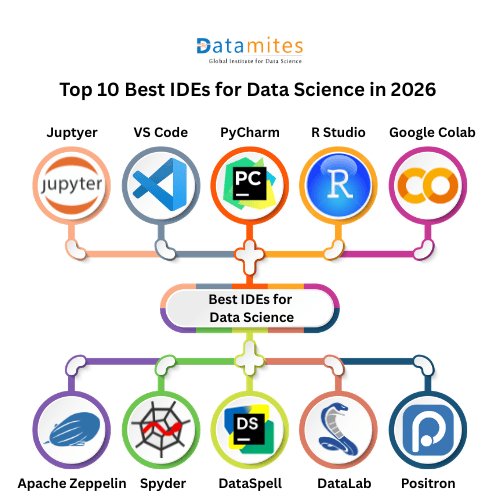
Data science workflows in 2026 demand powerful, flexible, and AI-enabled development environments. From interactive notebooks to full-scale IDEs, choosing the right tool can significantly improve productivity, model building, and data analysis.
Below are the top 10 IDEs for data science in 2026, widely used by professionals and beginners.
1. JupyterLab
Jupyter Notebook remains one of the most widely used tools in data science. Its interactive interface allows users to write code, visualize data, and document insights in a single environment.
Best for: Data analysis, experimentation, and research
Key features:
- Run code in cells (step-by-step execution)
- Combine code, text, and visualization
- Supports Python, R, Julia
Why it stands out: Widely used for prototyping and learning; over 70% of learners start with it
2. Visual Studio Code
Visual Studio Code has become a favorite among developers due to its lightweight design and powerful extensions. It supports Python, Jupyter notebooks, and various data science libraries.
Best for: Versatile development (beginner to advanced)
Key features:
- Jupyter integration inside editor
- Extensions for Python, ML, AI
- Built-in Git and debugging
Why it stands out: Lightweight yet powerful with huge plugin ecosystem
3. PyCharm (Data Science Edition)
PyCharm offers a professional environment specifically designed for Python development. It includes advanced debugging tools, code completion, and database integration.
Best for: Professional data science projects
Key features:
- Smart code completion and refactoring
- Built-in support for scientific libraries
- Database and web integration
Why it stands out: Ideal for production-level machine learning systems
4. Google Colab
Google Colab allows users to write and execute Python code directly in the browser. It provides free access to GPUs and TPUs, making it highly suitable for machine learning tasks.
Best for: Cloud-based data science
Key features:
- No setup required (runs in browser)
- Free GPU/TPU access
- Easy sharing and collaboration
Why it stands out: Perfect for beginners and remote work
5. Spyder
Spyder is designed for scientific computing and offers a clean interface similar to traditional development environments.
Best for: Scientific computing
Key features:
- Variable explorer
- MATLAB-like interface
- Built-in debugging tools
Why it stands out: Designed specifically for scientists and analysts
6. DataSpell
DataSpell is built specifically for data scientists, focusing on notebooks, data visualization, and exploratory analysis.
Best for: Dedicated data science workflows
Key features:
- Notebook-first environment
- SQL and database integration
- Smart environment detection
Why it stands out: Built specifically for data scientists by JetBrains
7. RStudio
RStudio is the go-to IDE for statistical computing and data visualization using R. It provides tools tailored for statistical modeling and reporting.
Best for: Statistical computing and R programming
Key features:
- Built specifically for R
- Strong visualization and reporting tools
- Integrated package management
Why it stands out: Preferred by statisticians and researchers
8. Apache Zeppelin
Apache Zeppelin is an open-source notebook that supports multiple languages. It is particularly useful for big data analytics and integrates well with tools like Apache Spark.
Best for: Big data and enterprise analytics
Key features:
- Multi-language notebook (Python, SQL, Scala)
- Integration with Apache Spark
- Real-time data visualization
Why it stands out: Strong in big data ecosystems
9. DataLab
DataLab is gaining popularity as a collaborative data science platform. It allows teams to work together on datasets and models in real time.
Best for: Enterprise analytics and collaboration
Key features:
- Centralized data workflows
- Collaboration tools
- Scalable data processing
Why it stands out: Used in enterprise-level analytics environments
10. Positron IDE
Positron IDE is an emerging tool designed for modern data workflows. It combines performance, usability, and integration with advanced analytics tools.
Best for: Modern R & Python workflows
Key features:
- Built on modern IDE architecture
- Focus on data workflows
- Integration with Posit ecosystem
Why it stands out: Emerging alternative to RStudio for modern teams
Refer to these articles:
- Why Bias, Fairness, and Transparency Are the New Metrics in Data Science
- How LLMs Are Transforming Data Science Careers in 2026
- Data Mesh vs Data Fabric in 2026: Choosing the Right Data Architecture
Which IDE Should You Choose?
Choosing the right IDE in 2026 is no longer just about preference it is directly influenced by how AI, cloud computing, and collaborative workflows are transforming data science. Below is a more detailed, insight-driven breakdown supported by recent market research and statistics.
Beginners: JupyterLab, Google Colab
For beginners, ease of use, minimal setup, and interactive learning are critical. Tools like JupyterLab and Google Colab provide notebook-based environments where users can experiment, visualize, and learn step-by-step.
Why these tools dominate for beginners:
- No complex environment setup (especially Colab)
- Visual and interactive learning approach
- Strong community and tutorials
Market Insight:
- Over 17.4 million developers globally are already using AI/ML tools, showing a massive entry-level adoption trend.
- Around 84% of developers use or plan to use AI tools, making beginner-friendly, AI-integrated IDEs essential.
Professionals: PyCharm, Visual Studio Code
Professional data scientists and ML engineers require scalability, debugging power, and production-ready environments.
Why these tools are preferred:
- Advanced debugging and refactoring
- Integration with production pipelines
- Support for large-scale projects
Market Insight:
- The global AI in software development market is expected to grow from $674 million in 2024 to over $15.7 billion by 2033, driven by automation and AI-assisted coding. (Source: Grand View Research)
- Studies show AI-assisted development can increase code output by up to 28% in enterprise environments.
Big Data Engineers: Apache Zeppelin
Big data workflows require tools that can handle distributed systems, real-time processing, and multi-language environments.
Why Zeppelin stands out:
- Native integration with Apache Spark
- Supports SQL, Python, and Scala
- Built for large-scale analytics
Market Insight:
The IDE software market is projected to reach $26.5 billion by 2032, with cloud-based IDEs holding over 42% market share, largely driven by big data and distributed computing needs.
Statisticians: RStudio
For statisticians and researchers, precision, reproducibility, and advanced visualization are essential.
Why RStudio remains dominant:
- Specialized for statistical analysis
- Strong reporting and visualization tools
- Widely used in academia and research
Market Insight:
AI adoption is highest in scientific, financial, and analytical sectors, where statistical tools remain critical.
Teams & Enterprises: DataLab
Enterprise environments require collaboration, governance, and scalability across teams.
Why enterprise IDEs are growing:
- Real-time collaboration
- Centralized data workflows
- Integration with cloud and enterprise systems
Market Insight:
- The global developer ecosystem has reached 27 million developers, with enterprise collaboration tools becoming essential for scaling workflows.
- AI adoption is significantly higher in large organizations, which are leading in deploying advanced development tools.
The best IDE for data science in 2026 depends on your goals, experience level, and project requirements. While JupyterLab and Google Colab are ideal for beginners, tools like PyCharm and VS Code provide advanced capabilities for professional workflows.
As data science continues to evolve, IDEs will become even more intelligent, collaborative, and cloud-driven. Choosing the right tool today will help you stay ahead in the rapidly growing field of data science.
DataMites Institute is a leading training provider known for industry-focused programs in data science, AI, and analytics. It offers hands-on learning, real-time projects, and globally recognized certifications to help learners build practical skills.
For those exploring a Data Science Course in Pune, DataMites provides flexible learning options with expert mentorship, making it ideal for both beginners and working professionals aiming to advance their careers.