How to Build an End-to-End Sales Data Analysis Project
Learn how to build an end-to-end sales data analysis project by collecting, cleaning, and analyzing sales data using Excel, SQL, Python, and Power BI. Explore key sales KPIs, customer trends, revenue insights, and interactive dashboards to support data-driven business decisions and improve sales performance.
 Kriti Maurya
A sales data analysis project helps businesses understand revenue trends, evaluate product performance, identify profitable markets, and make informed decisions using data. For aspiring data analysts, building an end-to-end sales analytics project is an effective way to develop practical skills in data cleaning, exploratory data analysis (EDA), SQL, Python, and dashboard development.
Unlike a project that focuses only on charts, an end-to-end sales data analysis project follows the complete analytical workflow from defining business objectives and preparing raw data to calculating key performance indicators (KPIs), building interactive dashboards, and translating findings into business recommendations.
This guide explains how to build a data analyst project step by step, including example Python code, SQL queries, KPI formulas, dashboard design suggestions, and portfolio documentation practices.
What Does Sales Data Analysis Project Involve?
A sales data analysis project involves collecting, cleaning, transforming, analyzing, and visualizing sales records to evaluate business performance.
Businesses use sales analytics to answer questions such as:
- Which products and categories generate the most revenue?
- How do monthly sales change over time?
- Which regions contribute the most to overall sales?
- What is the average value of an order?
- Which products generate high revenue but low profit?
- What actions could improve sales performance and profitability?
For example, a retail business may use historical order data to identify seasonal demand, compare regional performance, and decide which products require additional inventory or targeted marketing.
The goal is not simply to report numbers. It is to turn sales data into evidence that supports business decisions.
Step 1: Define the Business Objectives
Before opening Excel, writing SQL queries, or developing a dashboard, define the business questions the project should answer.
A clear problem statement helps determine which data fields, KPIs, and visualizations are required.
For a data analytics in retail project, the objectives could include:
- Measure total sales and profit over a selected period.
- Identify the highest-performing products and categories.
- Analyze monthly and yearly data analytics trends.
- Compare sales and profitability across regions.
- Evaluate order value and customer purchasing patterns.
- Recommend opportunities to improve profitability.
- Define the KPIs before analyzing the data
Establish consistent definitions for the metrics used throughout the project.
| KPI | Definition |
| Total Revenue | Sum of sales amounts |
| Total Orders | Count of distinct order IDs |
| Average Order Value (AOV) | Total revenue divided by distinct orders |
| Total Profit | Sum of profit values |
| Profit Margin | Total profit divided by total revenue, multiplied by 100 |
| Sales Growth | Percentage change in revenue between comparable periods |
Current Month Sales: Sales Growth Rate= {(Current Month Sales - Previous Month Sales)/ Previous Month Sales}* 100
If revenue increases from ₹8,00,000 to ₹9,20,000, monthly sales growth is 15%.
Always compare equivalent periods, such as one month against the previous month or one year against the previous year. If the comparison period has zero revenue, handle the calculation separately rather than dividing by zero.
Refer to the article below:
- What Is the CRISP-DM Process and Is It Still Useful for Data Analysts
- What Is Feasibility Analysis and How Is It Used in Data-Driven Decision-Making
- What Is a Snowflake Database and How Does It Work for Data Analytics
Step 2: Collect the Sales Dataset
The next step is to obtain a dataset containing the information required to answer the business questions.
Sales data may come from Excel workbooks, CSV files, relational databases, enterprise resource planning (ERP) systems, or customer relationship management (CRM) platforms.
For a beginner-friendly project, use a publicly available dataset.
Recommended dataset resources
- Sample Superstore: A widely used retail dataset for practicing sales, profit, product, customer, and regional analysis. Find relevant resources through Tableau's official sample-data documentation.
- Kaggle datasets: Explore public datasets for retail transactions, e-commerce orders, and sales forecasting.
- UCI Machine Learning Repository: Search for suitable retail and business datasets:
Before using a dataset, verify its source, license, permitted usage, and available fields. Record the original download location and any modifications made to the data.
Essential columns for a sales analysis project
| Column | Purpose |
| Order ID | Identifies an order |
| Order Date | Enables product-level comparisons |
| Category | Groups related products |
| Quantity | Measures units sold |
| Sales | Measures recorded sales value |
| Profit | Supports profitability analysis |
| Region | Enables geographic comparisons |
| Customer ID | Supports customer-level analysis |
Some datasets may not contain all these fields. For example, if cost or profit data is missing, you can analyze revenue and order patterns but should not claim to have measured profitability.
Step 3: Clean and Prepare the Data
Data cleaning is essential because duplicates, missing values, inconsistent formats, and incorrect data types can distort business results.
Begin by inspecting the dataset and understanding what one row represents. A row may represent an individual product line within an order rather than an entire order. This distinction matters when calculating order counts and average order value.
Common data-quality checks in data analysis:
- Identify duplicate records and investigate whether they represent genuine duplicate transactions.
- Check missing values in order dates, sales amounts, product identifiers, and other required fields.
- Convert dates into a consistent date format.
- Ensure sales, quantity, and profit columns use suitable numeric data types.
- Standardize inconsistent product categories and region names.
- Investigate negative quantities, returns, cancellations, and unusual transaction values.
- Verify that calculated totals match the source data.
Do not automatically delete every duplicate row or replace every missing value with zero. First determine what the records mean and whether the missing information is genuinely zero or simply unknown.
Example: Clean sales data using Python
The following example uses Pandas to inspect a CSV file and prepare a basic working dataset.
import pandas as pd
# Load the source dataset
df = pd.read_csv("sales_data.csv")
# Inspect the structure
print(df.head())
print(df.info())
print(df.isna().sum())
# Standardize column names
df.columns = (
df.columns.str.strip()
.str.lower()
.str.replace(" ", "_")
)
# Convert the order date to datetime
df["order_date"] = pd.to_datetime(
df["order_date"],
errors="coerce"
)
# Convert numeric columns
for col in ["sales", "quantity", "profit"]:
if col in df.columns:
df[col] = pd.to_numeric(
df[col],
errors="coerce"
)
# Check duplicate records
print("Duplicate rows:", df.duplicated().sum())
# Remove only confirmed duplicate records
df = df.drop_duplicates()
# Investigate missing required fields
required = ["order_date", "sales"]
print(df[required].isna().sum())
# Save the prepared dataset
df.to_csv("cleaned_sales_data.csv", index=False)
Document the cleaning decisions so another analyst can reproduce the process.
Step 4: Perform Exploratory Data Analysis (EDA)
Exploratory data analysis helps identify patterns, relationships, unusual values, and potential business opportunities before building the final dashboard.
Start with summary statistics, then examine sales across time, products, regions, and customers.
1. Analyze overall sales performance
Calculate total revenue, total profit, number of distinct orders, and average order value.
total_revenue = df["sales"].sum()
total_orders = df["order_id"].nunique()
average_order_value = (
total_revenue / total_orders
if total_orders > 0
else 0
)
print("Total Revenue:", total_revenue)
print("Total Orders:", total_orders)
print("Average Order Value:", average_order_value)
This example assumes the dataset has an order_id column and that sales is recorded at the order-line level. Confirm how returns, discounts, and canceled orders are represented before interpreting the results.
2. Analyze monthly sales trends
Group transactions by month to identify seasonality and changes in revenue.
df["month"] = (
df["order_date"].dt.to_period("M").dt.to_timestamp()
)
monthly_sales = (
df.groupby("month", as_index=False)["sales"]
.sum()
)
print(monthly_sales)
Plot the results using Matplotlib:
import matplotlib.pyplot as plt
plt.figure(figsize=(10, 5))
plt.plot(
monthly_sales["month"],
monthly_sales["sales"],
marker="o"
)
plt.title("Monthly Sales Trend")
plt.xlabel("Month")
plt.ylabel("Sales Revenue")
plt.xticks(rotation=45)
plt.tight_layout()
plt.show()
Look for recurring peaks, periods of declining sales, and sudden changes that may require further investigation. A peak in December, for instance, may reflect holiday demand, but the explanation should be tested against the dataset and business context.
3. Analyze product and regional performance
Compare revenue and profit by category and region.
category_performance = (
df.groupby("category", as_index=False)
.agg(
total_sales=("sales", "sum"),
total_profit=("profit", "sum")
)
.sort_values("total_sales", ascending=False)
)
print(category_performance)
The output helps identify which categories contribute the most revenue and whether their profitability follows the same pattern.
Repeat the analysis using region, product_name, or other relevant dimensions available in the dataset.
Revenue rankings alone are not enough to establish business success. A product with high sales may still have low or negative profit because of discounts, costs, returns, or fulfillment expenses.
Step 5: Calculate Essential Sales KPIs
Key performance indicators summarize business performance and help stakeholders compare results across periods, products, and regions.
Total revenue:
Total Revenue= ∑Sales
This measures the total recorded sales value for the selected scope and period. Confirm whether the source records gross sales, net sales, or sales after discounts and returns.
Total orders:
Total Orders = COUNTDISTINCT(Order ID)
Count distinct orders rather than transaction rows when one order can contain multiple products.
Average order value:
AOV=Total Revenue/ Number of Distinct Orders
AOV measures the average revenue associated with each order. It can help evaluate changes in basket size, pricing, or promotional activity.
Total profit and profit margin:
Total Profit =∑Profit
Profit Margin (%): {Total Profit/ Total Revenue} *100
Use a clearly defined profit measure. If the dataset provides only gross profit, do not describe the result as net profit. The denominator should be the corresponding revenue measure, and the metric should be interpreted in the context of the available cost data.
Sales growth:
Sales Growth={Current Period Sales−Previous Period Sales/ Previous Period Sales} * 100
Sales growth shows whether revenue is increasing or decreasing relative to a comparable period. Report the comparison window alongside the metric to prevent misleading conclusions.
Refer to the article below:
- Mastering Data Analytics in India
- What would be the Data Analyst Course Fee in India
- How to Become a Data Analyst in India
Step 6: Analyze Sales Data Using SQL
SQL is useful when sales records are stored in relational databases or when a project requires repeatable queries across large datasets.
Assume the database contains a table called sales with the columns order_id, order_date, product_name, category, region, sales, and profit.
Example 1: Calculate overall sales KPIs
SELECT
SUM(sales) AS total_revenue,
COUNT(DISTINCT order_id) AS total_orders,
SUM(sales) * 1.0
/ NULLIF(COUNT(DISTINCT order_id), 0)
AS average_order_value,
SUM(profit) AS total_profit,
100.0 * SUM(profit)
/ NULLIF(SUM(sales), 0)
AS profit_margin_pct
FROM sales;
The NULLIF expressions prevent division by zero. This query assumes that sales and profit values are recorded at a consistent transaction-line level and that the selected records form the intended reporting population.
Example 2: Compare monthly revenue
SELECT
EXTRACT(YEAR FROM order_date) AS sales_year,
EXTRACT(MONTH FROM order_date) AS sales_month,
SUM(sales) AS monthly_revenue
FROM sales
GROUP BY
EXTRACT(YEAR FROM order_date),
EXTRACT(MONTH FROM order_date)
ORDER BY
sales_year,
sales_month;
Date functions differ across database systems. Adapt this query for PostgreSQL, MySQL, SQL Server, or SQLite as needed.
Example 3: Identify high-revenue product categories
SELECT
category,
SUM(sales) AS total_revenue,
SUM(profit) AS total_profit
FROM sales
GROUP BY category
ORDER BY total_revenue DESC;
Use the output to identify categories that contribute substantial revenue and then investigate whether they also generate strong profits.
Step 7: Build an Interactive Sales Dashboard
A dashboard brings the analysis together in a format that business users can explore without running queries or reading code.
Power BI and Tableau are useful for presenting KPI cards, charts, comparisons, and interactive filters.
For a practical sales dashboard project, organize the report into four areas.
1. Executive overview
- Total revenue
- Total orders
- Average order value
- Total profit
- Profit margin
2. Sales trends
- Monthly or quarterly revenue line chart
- Year-over-year or month-over-month growth
- Seasonal comparisons where sufficient historical data exists
3. Product and regional performance
- Revenue and profit by category
- Top products by sales
- Regional sales comparisons
- Products with negative profit, where profit data is available
4. Customer analysis
- Revenue by customer segment
- Average order value by segment
- Repeat-purchase patterns when customer and transaction history support the analysis
- Recommended dashboard filters
Include filters for date, region, product category, and customer segment where these fields are available.
Use consistent currency formatting, readable labels, appropriate chart scales, and clear date ranges. Keep related KPIs together and avoid adding decorative charts that do not answer a business question.
A good dashboard should make it easy for a stakeholder to answer three questions: What happened? Where did it happen? What should we investigate next?
Step 8: Interpret Findings and Recommend Business Actions
The final stage is to turn the analytical results into actionable recommendations.
Avoid simply stating that one category has the highest sales. Explain why the finding matters, what additional evidence may be needed, and what action the business could take.
Consider these examples of evidence-based interpretation:
| Potential finding | Follow-up analysis | Possible action |
| Revenue declines over several months | Compare categories, regions, prices, and order volumes | Investigate demand changes and test targeted sales initiatives |
| A category generates high revenue but low profit | Examine discounts, product costs, returns, and fulfillment costs | Review pricing and promotional effectiveness |
| One region consistently outperforms others | Compare customer mix, product availability, and marketing activity | Evaluate whether successful approaches can be adapted elsewhere |
| A product sells well in specific months | Review historical seasonality and inventory availability | Improve demand planning for comparable periods |
These are examples of how to interpret findings, not claims about a specific dataset.
A strong recommendation connects the observation to a measurable action. For example, if an analysis identifies a decline in category-level profit margin, the business could investigate discounting and product costs, test a pricing adjustment, and track the change in margin over a defined period.
Where possible, define a baseline, a target, a time frame, and a measurement method for evaluating whether the recommendation works.
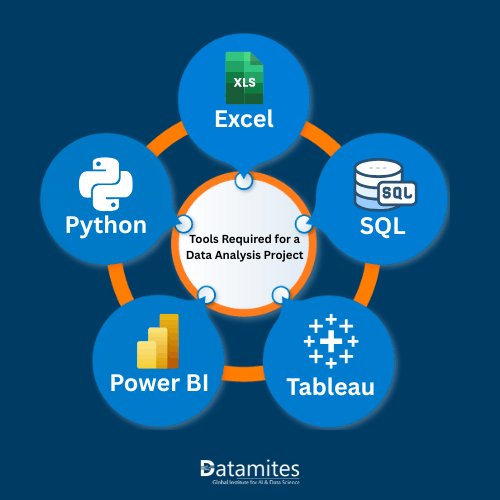
Tools Required for a Sales Data Analysis Project
The best tool depends on dataset size, project requirements, and the data analyst skills you want to demonstrate.
| Tool | Main use of data anlyst tools |
| Excel | Data cleaning, formulas, pivot tables, and basic reporting |
| SQL | Querying, joining, filtering, and aggregating structured data |
| Python | Data preparation, statistical analysis, visualization, and automation |
| Power BI | Interactive dashboards and business reporting |
| Tableau | Visual analytics and interactive data exploration |
Beginners can start with Excel and Power BI, then add SQL and Python to demonstrate a more complete analytical workflow. You do not need to use every tool in one project; choose a combination that supports the business objectives and explain why you selected it.
How to Showcase Your Sales Data Analysis Project
A portfolio project should demonstrate both technical capability and business thinking.
Include the following deliverables:
- Project overview: Describe the business problem, objectives, and questions being investigated.
- Dataset source: Link to the original dataset and explain its fields, license, and limitations.
- Data Preparation for Data Analysis: Document missing values, duplicates, transformations, and assumptions.
- Technical implementation: Include the SQL queries, Python scripts, or Excel formulas used.
- KPI definitions: State how revenue, orders, profit margin, and growth were calculated.
- Dashboard: Include readable screenshots and, if appropriate, a link to an accessible interactive report.
- Key findings: Present actual calculated results, with charts and supporting explanations.
- Recommendations: Explain the actions suggested by the evidence and how success could be measured.
- Limitations: Identify gaps in the data, assumptions, and analyses that would require additional information.
Publish the project on GitHub with a clear README file. Organize files into folders such as data, notebooks, sql, dashboard, and documentation. Do not upload confidential company records, personal customer information, or data that you are not authorized to share.
Common Mistakes to Avoid while working on data analyst project
- Counting transaction rows instead of distinct orders.
- Treating missing values as zero without investigation.
- Removing duplicates without understanding the dataset's grain.
- Comparing incomplete months with full months without accounting for the difference.
- Confusing revenue with profit or gross profit with net profit.
- Presenting correlations vs causation.
- Publishing numerical findings that have not been verified against the data.
- Creating a dashboard without explaining what decisions its metrics support.
- Avoiding these mistakes improves the accuracy, reproducibility, and credibility of the project.
The strongest projects go beyond visualizations. They document their methodology, explain the limitations of the available data, present verifiable findings, and connect recommendations to measurable business outcomes. According to Persistence Market Research, the global sales analytics software market is projected to expand from USD 4.1 billion in 2022 to USD 12.3 billion by 2032, registering a compound annual growth rate (CAGR) of 11.6%.
Refer to the article below:
- What Is Categorical Analysis and How Do Data Analysts Use It
- Introduction to ETL in Data Analytics
- What’s Next for Data Analysts? Predictive and Prescriptive Analytics
For beginners, a well-documented project using Excel, SQL, Python, or Power BI can become a valuable portfolio asset. The key is to demonstrate not just which tools were used, but how the analysis helped answer a business question and what decisions the evidence supports.
DataMites Institute offers career-oriented training programs in Data Science, Artificial Intelligence, Machine Learning, and Data Analytics. Learners interested in strengthening their analytical expertise can explore the Data Analyst Course in Chennai, which focuses on developing practical skills through industry-relevant learning. The institute emphasizes hands-on projects, internship opportunities, and placement assistance to support career development. With certifications associated with IABAC and NASSCOM FutureSkills, DataMites provides flexible online and classroom training options to accommodate diverse learning preferences.
Along with DataMites Coimbatore, the institute has a presence across several major Indian cities, including Bangalore, Pune, Chennai, Mumbai, Kolkata, Coimbatore, and Chandigarh. This network of locations enables learners to explore training opportunities through accessible learning options.