 4.9 (16,000) reviews
 110,000
55,451*
NO COST EMI : 9,242 p.m for 6 Months
*Offer valid till 5th April 2026
Instructor Led Live Online
Self Learning + Live Mentoring
In - Person Classroom Training



MODULE 1: DATA ANALYSIS FOUNDATION
• Data Analysis Introduction
• Data Preparation for Analysis
• Common Data Problems
• Various Tools for Data Analysis
• Evolution of Analytics domain
MODULE 2: CLASSIFICATION OF ANALYTICS
• Four types of the Analytics
• Descriptive Analytics
• Diagnostics Analytics
• Predictive Analytics
• Prescriptive Analytics
• Human Input in Various type of Analytics
MODULE 3: CRIP-DM Model
• Introduction to CRIP-DM Model
• Business Understanding
• Data Understanding
• Data Preparation
• Modeling, Evaluation, Deploying,Monitoring
MODULE 4: UNIVARIATE DATA ANALYSIS
• Summary statistics -Determines the value’s center and spread.
• Measure of Central Tendencies: Mean, Median and Mode
• Measures of Variability: Range, Interquartile range, Variance and Standard Deviation
• Frequency table -This shows how frequently various values occur.
• Charts -A visual representation of the distribution of values.
MODULE 5: DATA ANALYSIS WITH VISUAL CHARTS
• Line Chart
• Column/Bar Chart
• Waterfall Chart
• Tree Map Chart
• Box Plot
MODULE 6: BI-VARIATE DATA ANALYSIS
• Scatter Plots
• Regression Analysis
• Correlation Coefficients
MODULE 1: PYTHON BASICS
• Introduction of python
• Installation of Python and IDE
• Python Variables
• Python basic data types
• Number & Booleans, strings
• Arithmetic Operators
• Comparison Operators
• Assignment Operators
MODULE 2: PYTHON CONTROL STATEMENTS
• IF Conditional statement
• IF-ELSE
• NESTED IF
• Python Loops basics
• WHILE Statement
• FOR statements
• BREAK and CONTINUE statements
MODULE 3: PYTHON DATA STRUCTURES
• Basic data structure in python
• Basics of List
• List: Object, methods
• Tuple: Object, methods
• Sets: Object, methods
• Dictionary: Object, methods
MODULE 4: PYTHON FUNCTIONS
• Functions basics
• Function Parameter passing
• Lambda functions
• Map, reduce, filter functions
MODULE 1 : OVERVIEW OF STATISTICS
MODULE 2 : HARNESSING DATA
MODULE 3 : EXPLORATORY DATA ANALYSIS
MODULE 4 : HYPOTHESIS TESTING
MODULE 1: COMPARISION AND CORRELATION ANALYSIS
• Data comparison Introduction,
• Performing Comparison Analysis on Data
• Concept of Correlation
• Calculating Correlation with Excel
• Comparison vs Correlation
• Hands-on case study : Comparison Analysis
• Hands-on case study Correlation Analysis
MODULE 2: VARIANCE AND FREQUENCY ANALYSIS
• Variance Analysis Introduction
• Data Preparation for Variance Analysis
• Performing Variance and Frequency Analysis
• Business use cases for Variance Analysis
• Business use cases for Frequency Analysis
MODULE 3: RANKING ANALYSIS
• Introduction to Ranking Analysis
• Data Preparation for Ranking Analysis
• Performing Ranking Analysis with Excel
• Insights for Ranking Analysis
• Hands-on Case Study: Ranking Analysis
MODULE 4: BREAK EVEN ANALYSIS
• Concept of Breakeven Analysis
• Make or Buy Decision with Break Even
• Preparing Data for Breakeven Analysis
• Hands-on Case Study: Manufacturing
MODULE 5: PARETO (80/20 RULE) ANALSYSIS
• Pareto rule Introduction
• Preparation Data for Pareto Analysis,
• Performing Pareto Analysis on Data
• Insights on Optimizing Operations with Pareto Analysis
• Hands-on case study: Pareto Analysis
MODULE 6: Time Series and Trend Analysis
• Introduction to Time Series Data
• Preparing data for Time Series Analysis
• Types of Trends
• Trend Analysis of the Data with Excel
• Insights from Trend Analysis
MODULE 7: DATA ANALYSIS BUSINESS REPORTING
• Management Information System Introduction
• Various Data Reporting formats
• Creating Data Analysis reports as per the requirements
MODULE 1: DATA ANALYTICS FOUNDATION
• Business Analytics Overview
• Application of Business Analytics
• Benefits of Business Analytics
• Challenges
• Data Sources
• Data Reliability and Validity
MODULE 2: OPTIMIZATION MODELS
• Predictive Analytics with Low Uncertainty;Case Study
• Mathematical Modeling and Decision Modeling
• Product Pricing with Prescriptive Modeling
• Assignment 1 : KERC Inc, Optimum Manufacturing Quantity
MODULE 3: PREDICTIVE ANALYTICS WITH REGRESSION
• Mathematics behind Linear Regression
• Case Study : Sales Promotion Decision with Regression Analysis
• Hands on Regression Modeling in Excel
MODULE 4: DECISION MODELING
• Predictive Analytics with High Uncertainty
• Case Study-Monte Carlo Simulation
• Comparing Decisions in Uncertain Settings
• Trees for Decision Modeling
• Case Study : Supplier Decision Modeling - Kickathlon Sports Retailer
MODULE 1: MACHINE LEARNING INTRODUCTION
• What Is ML? ML Vs AI
• ML Workflow, Popular ML Algorithms
• Clustering, Classification And Regression
• Supervised Vs Unsupervised
MODULE 2: ML ALGO: LINEAR REGRESSSION
• Introduction to Linear Regression
• How it works: Regression and Best Fit Line
• Hands-on Linear Regression with ML Tool
MODULE 3: ML ALGO: LOGISTIC REGRESSION
• Introduction to Logistic Regression;
• Classification & Sigmoid Curve
• Hands-on Logistics Regression with ML Tool
MODULE 4: ML ALGO: KNN
• Introduction to KNN; Nearest Neighbor
• Regression with KNN
• Hands-on: KNN with ML Tool
MODULE 5: ML ALGO: K MEANS CLUSTERING
• Understanding Clustering (Unsupervised)
• Introduction to KMeans and How it works
• Hands-on: K Means Clustering
MODULE 6: ML ALGO: DECISION TREE
• Decision Tree and How it works
• Hands-on: Decision Tree with ML Tool
MODULE 7: ML ALGO: SUPPORT VECTOR MACHINE (SVM)
• Introduction to SVM
• How It Works: SVM Concept, Kernel Trick
• Hands-on: SVM with ML Tool
MODULE 8: ARTIFICIAL NEURAL NETWORK (ANN)
• Introduction to ANN, How It Works
• Back propagation, Gradient Descent
• Hands-on: ANN with ML Tool
MODULE 1: DATABASE INTRODUCTION
• DATABASE Overview
• Key concepts of database management
• CRUD Operations
• Relational Database Management System
• RDBMS vs No-SQL (Document DB)
MODULE 2: SQL BASICS
• Introduction to Databases
• Introduction to SQL
• SQL Commands
• MY SQL workbench installation
MODULE 3: DATA TYPES AND CONSTRAINTS
• Numeric, Character, date time data type
• Primary key, Foreign key, Not null
• Unique, Check, default, Auto increment
MODULE 4: DATABASES AND TABLES (MySQL)
• Create database
• Delete database
• Show and use databases
• Create table, Rename table
• Delete table, Delete table records
• Create new table from existing data types
• Insert into, Update records
• Alter table
MODULE 5: SQL JOINS
• Inner join, Outer Join
• Left join, Right Join
• Self Join, Cross join
• Windows Functions: Over, Partition, Rank
MODULE 6: SQL COMMANDS AND CLAUSES
• Select, Select distinct
• Aliases, Where clause
• Relational operators, Logical
• Between, Order by, In
• Like, Limit, null/not null, group by
• Having, Sub queries
MODULE 7: DOCUMENT DB/NO-SQL DB
• Introduction of Document DB
• Document DB vs SQL DB
• Popular Document DBs
• MongoDB basics
• Data format and Key methods
• MongoDB data management
MODULE 1: BIG DATA INTRODUCTION
• Big Data Overview
• Five Vs of Big Data
• What is Big Data and Hadoop
• Introduction to Hadoop
• Components of Hadoop Ecosystem
• Big Data Analytics Introduction
MODULE 2: HDFS AND MAP REDUCE
• HDFS – Big Data Storage
• Distributed Processing with Map Reduce
• Mapping and reducing stages concepts
• Key Terms: Output Format, Partitioners, Combiners, Shuffle, and Sort
MODULE 3: PYSPARK FOUNDATION
• PySpark Introduction
• Spark Configuration
• Resilient distributed datasets (RDD)
• Working with RDDs in PySpark
• Aggregating Data with Pair RDDs
MODULE 4: SPARK SQL and HADOOP HIVE
• Introducing Spark SQL
• Spark SQL vs Hadoop Hive
MODULE 1: TABLEAU FUNDAMENTALS
• Introduction to Business Intelligence & Introduction to Tableau
• Interface Tour, Data visualization: Pie chart, Column chart, Bar chart.
• Bar chart, Tree Map, Line Chart
• Area chart, Combination Charts, Map
• Dashboards creation, Quick Filters
• Create Table Calculations
• Create Calculated Fields
• Create Custom Hierarchies
MODULE 2: POWER-BI BASICS
• Power BI Introduction
• Basics Visualizations
• Dashboard Creation
• Basic Data Cleaning
• Basic DAX FUNCTION
MODULE 3: DATA TRANSFORMATION TECHNIQUES
• Exploring Query Editor
• Data Cleansing and Manipulation:
• Creating Our Initial Project File
• Connecting to Our Data Source
• Editing Rows
• Changing Data Types
• Replacing Values
MODULE 4: CONNECTING TO VARIOUS DATA SOURCES
• Connecting to a CSV File
• Connecting to a Webpage
• Extracting Characters
• Splitting and Merging Columns
• Creating Conditional Columns
• Creating Columns from Examples
• Create Data Model
I joined DataMites for the Certified Data Scientist online course, and it was a great experience! The real-time projects helped me apply my learning practically, and the placement support added real value to my career restart after 8 years. DataMites is the perfect platform to learn, grow, and begin your data science journey.
I joined DataMites for the Data Science course and learned Python, SQL, Machine Learning, and Deep Learning through hands-on projects. The trainers are excellent at explaining concepts clearly. The placement team is very supportive and provides great opportunities thanks to DataMites for helping me start my data science journey.
I joined DataMites after my B.Tech when I developed an interest in Data Science and Machine Learning. The training was well-structured, and I even got an internship opportunity that helped me gain real experience. The placement team was super supportive and guided me through every step. Thanks to DataMites, I’m now placed at Horizon Broadband Pvt. Ltd.
I joined DataMites after completing my BCA, and it was the best decision for my data science career! I learned Python, SQL, Machine Learning, Deep Learning, and NLP, and worked on several capstone and client projects that gave me real-world experience. The trainers and team were always friendly and supportive, patiently clearing all my doubts. Thanks to DataMites, I’m confident and job-ready in data science
I started my data science journey with DataMites, and it’s been an amazing experience! The Certified Data Scientist Program helped me learn everything from scratch through hands-on projects and an internship. The placement team was incredibly supportive, always ready to clarify my doubts. Thanks to their guidance, I successfully got placed. Highly recommend DataMites to anyone starting their data science career
Enrolling at DataMites was one of the best decisions I made for my career. Coming from a freelance writing background with no prior technical experience, I was initially unsure about stepping into the field of data analytics. But DataMites made the transition smooth and achievable. I’d highly recommend them to anyone looking for a guided, industry-ready data analytics course. A true DataMites success story!
Enrolling in a Data Analyst course in Shimla offers quality education in a peaceful learning environment with affordable living costs. The course helps students and professionals build strong analytical skills, gain hands-on experience with industry tools, and prepare for data-driven roles across multiple sectors in India.
The Data Analyst course duration in Shimla generally ranges from 4 to 6 months. The duration varies based on learning mode, curriculum structure, practical training, real-time projects, internships, and placement-focused preparation provided by the institute.
The fee for Data Analyst courses in Shimla typically ranges between INR 30,000 and INR 1,50,000. Costs depend on factors such as training mode, certifications, project exposure, internship inclusion, faculty expertise, and placement support offered by the institute.
To choose the best Data Analyst institute in Shimla, evaluate curriculum relevance, trainer experience, live projects, industry-recognized certifications, placement assistance, flexible schedules, and learner reviews. Practical exposure and career support are key indicators of quality training.
The future scope of Data Analysts in India is strong due to increasing data adoption across IT, finance, healthcare, retail, and government sectors. Organizations rely on analytics for decision-making, ensuring long-term demand, career stability, and growth opportunities.
In India, entry-level Data Analysts earn INR 3–6 LPA, mid-level professionals earn INR 6–10 LPA, and experienced analysts earn INR 12–20 LPA. Salaries depend on analytics skills, tools expertise, domain knowledge, company size, and years of experience.
The Data Analyst course syllabus includes Excel, SQL, Python or R, statistics, Power BI or Tableau, data visualization, data cleaning, business analytics, real-time projects, case studies, and interview preparation aligned with industry requirements.
After completing a Data Analyst course in Shimla, learners can work as Data Analyst, Business Analyst, MIS Analyst, Reporting Analyst, Product Analyst, Operations Analyst, or Analytics Executive across IT, finance, healthcare, and retail industries.
Data Analysts handle projects such as sales forecasting, customer segmentation, churn analysis, marketing dashboards, financial reporting, operational analytics, and business intelligence solutions using structured and real-world business datasets.
Programming knowledge is helpful but not mandatory to begin a Data Analyst career. Most courses teach SQL and Python from basics. Strong data interpretation, logical thinking, and visualization skills are more important at the entry level.
Companies hiring Data Analysts in India include TCS, Infosys, Wipro, Accenture, Cognizant, IBM, Deloitte, Amazon, Flipkart, Paytm, startups, consulting firms, and organizations across BFSI and healthcare sectors.
After a Data Analyst course in Shimla, professionals can grow into Senior Data Analyst, Business Analyst, BI Analyst, Analytics Consultant, Product Analyst, or transition into Data Science with advanced technical training.
In finance, data analytics supports fraud detection, risk analysis, and forecasting. In healthcare, it improves patient care, resource planning, disease prediction, and operational efficiency through data-driven insights.
Yes, working professionals can pursue Data Analyst courses in Shimla through weekend, part-time, or online modes. Flexible schedules help professionals upskill without disrupting their current employment commitments.
Yes, a Data Analyst career is suitable for non-technical backgrounds like commerce, arts, and management. Courses start with basics and focus on practical tools, business understanding, and applied analytics rather than heavy coding.
DataMites is a top Data Analyst institute in Shimla due to its industry-aligned curriculum, expert trainers, hands-on projects, internships, and placement support. The course is backed by IABAC® and NASSCOM FutureSkills certifications.
Yes, DataMites offers internships as part of its Data Analyst course in Shimla. Learners gain real-world exposure by working on live datasets and practical projects that strengthen resumes and job readiness.
Yes, DataMites provides flexible EMI options for Data Analyst courses in Shimla, allowing students and working professionals to pay course fees conveniently without financial pressure.
DataMites follows a transparent refund policy based on cancellation timelines and course progress. Refund terms are clearly communicated during enrollment to ensure fairness and learner confidence.
The Data Analyst course fee at DataMites Shimla varies by learning mode such as online, blended, or classroom. Fees are competitively priced and include certifications, projects, internships, and placement assistance.
The Data Analyst course at DataMites Shimla typically lasts 4 to 6 months, depending on the chosen learning mode and pace, including structured training, projects, internships, and career support.
Yes, DataMites Shimla includes multiple live and capstone Data Analyst projects using real business datasets to help learners build practical skills and a strong professional portfolio.
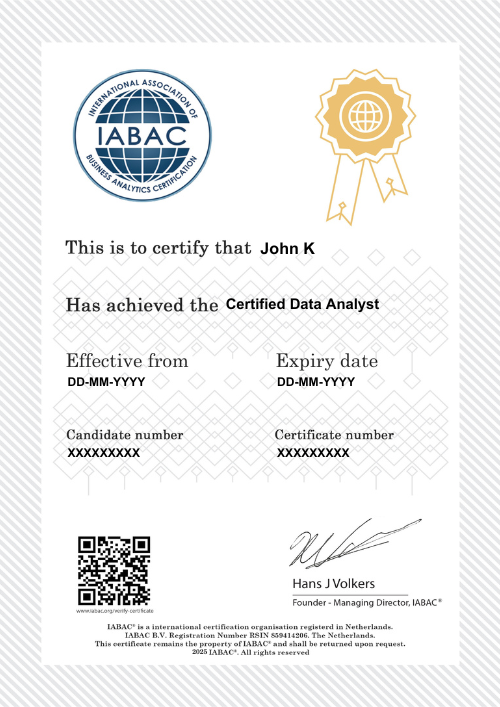
After course completion, learners receive globally recognized certifications from IABAC® and NASSCOM FutureSkills, validating analytics expertise and improving job credibility.
DataMites accepts multiple payment options including UPI, debit cards, credit cards, net banking, and EMI facilities for a smooth and convenient enrollment process.
DataMites operates more than 30 training centres across major Indian cities, along with online and blended learning options, making analytics training accessible nationwide.
The DataMites Flexi Pass allows learners to attend missed sessions, switch batches, revisit classes, and access recorded content for extended learning flexibility.
DataMites Institute is headquartered in Bangalore at Bajrang House, 7th Mile, C-25, Bengaluru–Chennai Highway, Kudlu Gate, Garvebhavi Palya, Bengaluru, Karnataka 560068, serving as its central operations hub.
The DataMites Placement Assistance Team(PAT) facilitates the aspirants in taking all the necessary steps in starting their career in Data Science. Some of the services provided by PAT are: -
The DataMites Placement Assistance Team(PAT) conducts sessions on career mentoring for the aspirants with a view of helping them realize the purpose they have to serve when they step into the corporate world. The students are guided by industry experts about the various possibilities in the Data Science career, this will help the aspirants to draw a clear picture of the career options available. Also, they will be made knowledgeable about the various obstacles they are likely to face as a fresher in the field, and how they can tackle.
No, PAT does not promise a job, but it helps the aspirants to build the required potential needed in landing a career. The aspirants can capitalize on the acquired skills, in the long run, to a successful career in Data Science.
 Refer & Earn
 +1-628-228-6062